vanshikamunjal665-containerization-theory.github.io
CONTAINERIZATION AND DEVOPS THEORY
22 JANUARY 2026
DOCKER BASIC COMMANDS
Reference Link:
https://upessocs.github.io/#dir=/Lectures/Containerization%20and%20DevOps/Theory/Containerization%20and%20DevOps/Theory/&file=011%20Docker%20basic%20commands.md
Screenshots of commands
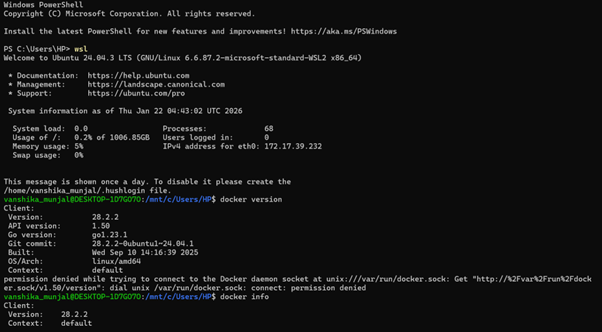
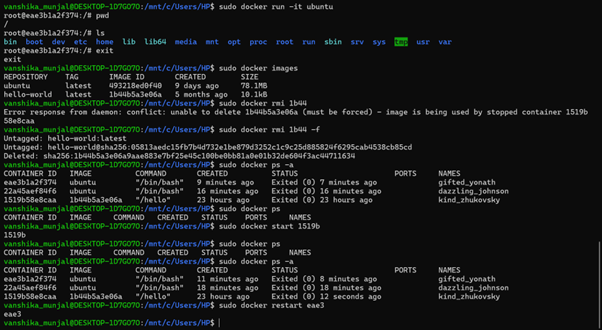
1. Enter wsl
wsl
2. Check docker version
docker version
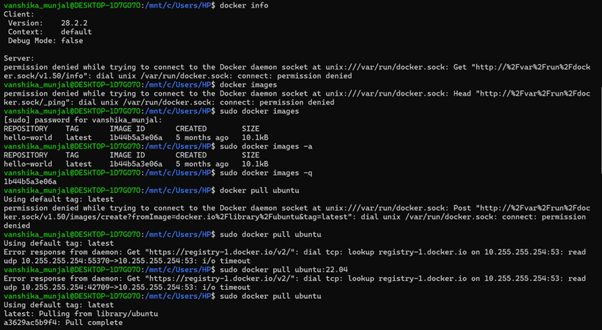
docker info
3. Image Management
-
List local images
sudo docker images -
Show all images
docker images -a -
Only image IDs
docker images -q
4. Pull image from registry
sudo docker pull ubuntu
- specifies version
sudo docker pull ubuntu:22.04
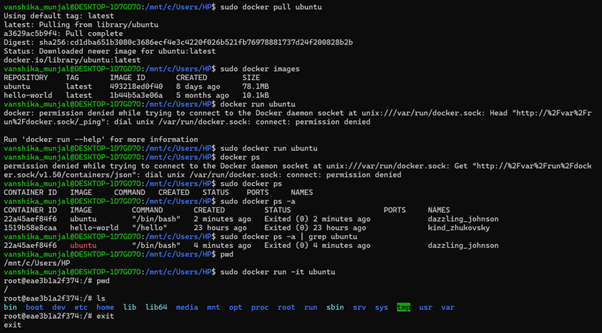
5. List all Docker images present on the system
sudo docker images
6. Creating a new container from Ubuntu image
The container starts and immediately exits
sudo docker run ubuntu
7. Shows containers
-
Show all running containers
sudo docker ps -
Show all containers (running+stopped+exited)
sudo docker ps -a -
Show only container IDs
sudo docker ps -q -
Filter ubuntu related containers
sudo docker ps -a | grep ubuntu—
8. Creating a new container from Ubuntu image
it= interactive terminal
you are inside ubuntu container
sudo docker run -it ubuntu
now you are inside container
9. Checking current directory
pwd
Docker containers have their own isolated filesystem
/ is the root directory of the container
It is NOT connected to your Windows folders by default
10. Showing linux directories
ls
You are now inside a real Linux environment.
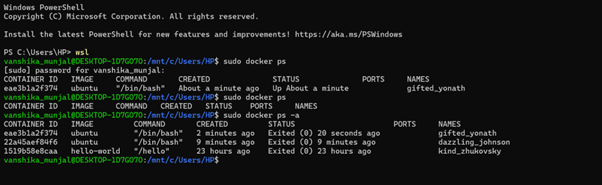
11. Checking if the container is running (in another terminal)
wsl
sudo docker ps
The container is running
12. Exiting container
exit
Exiting shell = container stops if no background process.
13. Again checking if container is running (in another terminal)
sudo docker ps
sudo docker ps -a
The container is stopped.
14. Removing images
sudo docker images
sudo docker rmi 1b44 (error: The Ubuntu image is still linked to stopped containers, Docker protects images from deletion if containers exist)
sudo docker rmi 1b44 -f (force remove)
sudo docker ps -a (shows all containers (running + stopped), Containers still exist, but their image has been removed, they cannot be restarted properly now)
15. Start and restart containers
sudo docker ps
sudo docker start 1519b
sudo docker ps -a
sudo docker restart eae3